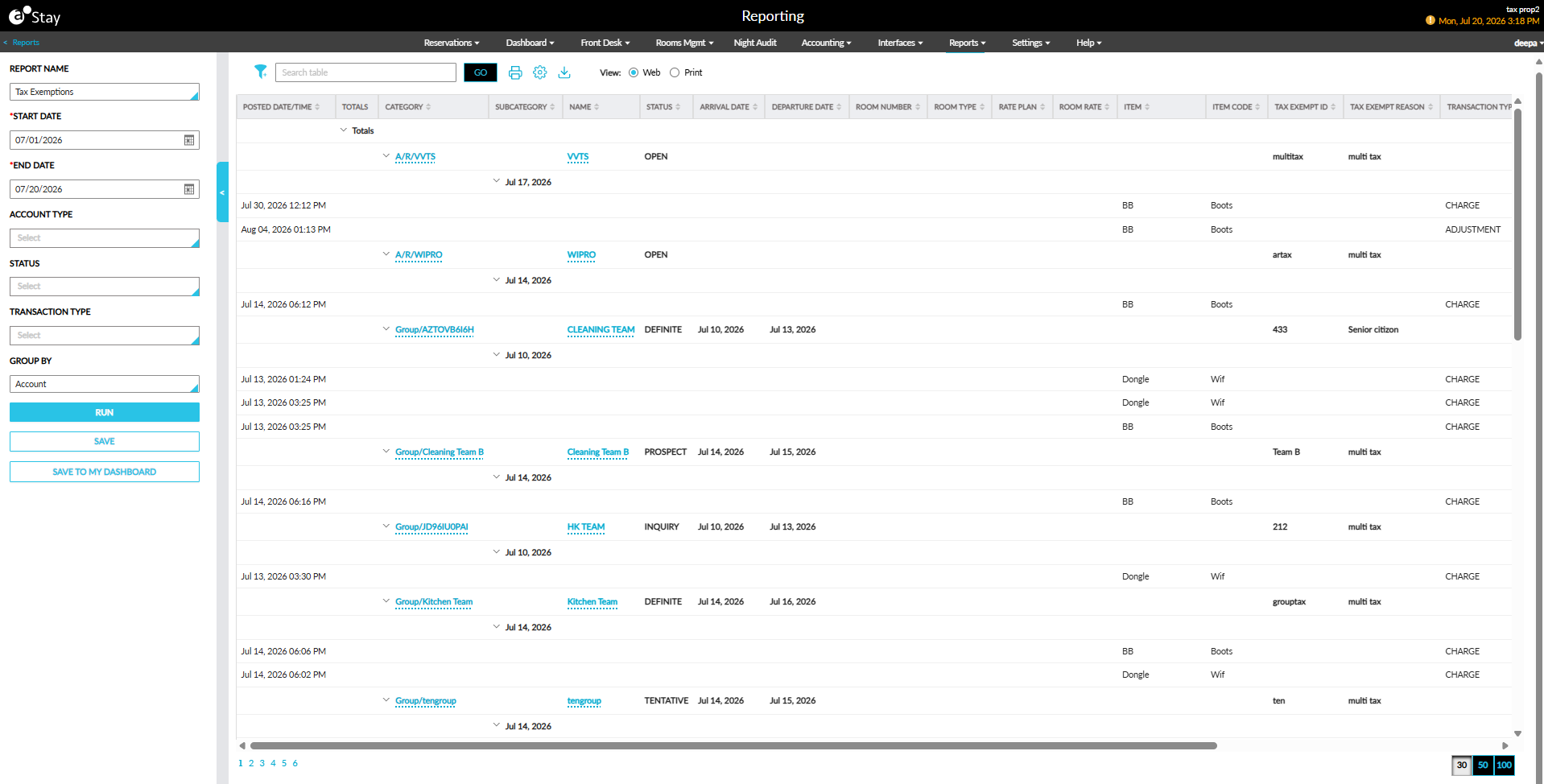
Tax Exemptions Report (Dynamic) Enhancements
The Tax Exemptions report (Dynamic) has been enhanced to be made available to all users by default and to provide additional filtering and reservation details.
Only the tax-exempt charges posted after the Track Tax Exemption flag is enabled in the Accounting tab of the Guest Accounting screen will be included in the report. Charges posted prior to activation of the flag will not be included.
Status Filter
A new report generation parameter, Status, has been added to the report and is displayed below the Account parameter. The Status parameter is a multi-select drop-down list, with the Select All option selected by default.
When Reservation is selected as the Account Type, selecting a Status is mandatory.
Users can select one or more of the following statuses:
-
For Reservation accounts: In-House, Departed, Reserved, Cancelled, and No-Show.
-
For Group accounts: Definite, Tentative, Cancelled, Inquiry, Turndown, and Prospect.
-
For A/R and House accounts: Open, Closed, Hold, and Pending.
New Report Columns
The report is also enhanced to provide additional reservation-level details. The following new columns are available in the Column Settings pop-up screen and are selected by default for both Print and Display. These selections cannot be modified by users.
|
Column |
Description |
|---|---|
|
Status |
The reservation or account status. Users can search and sort this column. |
|
Arrival Date |
The reservation arrival date based on the property's configured date format. For group reservations, the group arrival date is displayed. This field is not applicable to A/R accounts and is displayed blank. Users can search and sort this column. |
|
Departure Date |
The reservation departure date based on the property's configured date format. For group reservations, the group departure date is displayed. This field is not applicable to A/R accounts and is displayed blank. Users can search and sort this column. |
|
Room Number |
The room number assigned to the reservation. When the reservation includes a scheduled room move, the room number assigned for the first night is displayed. This field is not applicable to group and A/R accounts and is displayed blank. Users can search and sort this column. |
|
Room Type |
The room type assigned to the reservation. If the reservation includes a scheduled room move, the room type for the first night is displayed. This field is not applicable to group and A/R accounts and is displayed blank. Users can search and sort this column. |
|
Rate Plan |
The rate plan or package rate plan name associated with the reservation. The rate plan for the first night of the reservation is displayed. This field is not applicable to group and A/R accounts and is displayed blank. Users can search and sort this column. |
|
Room Rate |
The room rate for the first night of the reservation. For package reservations, the value includes the Room Rate + Inclusive Component Rate. This field is not applicable to group and A/R accounts and is displayed blank. Users can search and sort this column. |
|
Tax Class |
The tax class associated with the item. Users can search and sort this column. |